Send a quotation on WhatsApp as a link to a hosted quote, or as a PDF if the client wants a file, never as a screenshot or prices typed into the chat. Keep the message to three or four lines: name the job, the total and the validity date, and ask for a reply. Five copy-paste messages are below.
In Pakistan and the Gulf, WhatsApp is where the client actually reads things; email is where the quotation goes to be filed. That makes WhatsApp the right channel and the easiest place to look unprofessional, so the format matters more than the words.
Should you send the quotation as a PDF, a link or a message?
A link first, a PDF second, a typed message never.
A link to a hosted quotation opens on any phone without a download, shows every line, the tax, the total and your terms, and still works when the client forwards it to a partner or an accountant. With EstimateQuote the link also carries an Accept button, so the acceptance happens on the document, not in the conversation.
A PDF is right when the client has to attach it to a purchase order, print it or send it to a procurement office. Name the file properly, for example Quotation-Q-0142-Ahmed-Residence.pdf, so it can be found again. A PDF is a snapshot: if the price changes you send a new one and say which is current.
A typed message, a voice note or a screenshot of Excel is where disputes start. The client cannot see the lines, cannot compare it with another bid and cannot tell which of the four numbers you sent over two days is the real one. Without a tool, the free BOQ template gives you a clean PDF to attach.
What should the WhatsApp message say?
The quotation does the explaining. The message only says what the attachment is, what it costs, how long it holds, and what you want the client to do. Use the client's name and your own greeting style; opening with a line in Urdu or Arabic is fine if that is how you talk to this client. The templates are in English, and each one is ready to copy.
First send
Assalam o alaikum [Name], [Your name] from [Business] here. Please find the quotation for [job, e.g. rewiring the 2-bed flat at Gulberg] at this link: [quote link]
Total is PKR [amount] including sales tax, valid until [date]. Everything is itemised, with what is included and what is not.
Have a look when you get a minute and let me know if anything needs changing.
Reminder (3 to 4 days later, if not opened)
Hi [Name], just checking the quotation for [job] reached you. Here is the link again: [quote link]
It is valid until [date]. Happy to walk through any line on a quick call.
After they have opened it
Hi [Name], I saw you had a chance to look at the quotation for [job]. Anything you would like me to adjust, in scope, timing or payment terms?
If it works as it is, you can accept it from the link and I will book the start date.
Revised price
Hi [Name], as discussed, I have revised the quotation for [job]: [what changed, e.g. removed the false ceiling and changed the tiles to the 2 x 2 ft option].
New total is PKR [amount], valid until [date]. The updated quotation is here: [quote link]. The earlier figure no longer applies.
Acceptance confirmation
Thank you [Name], quotation [Q-number] for [job] is confirmed at PKR [amount]. As per the terms, the advance of PKR [deposit] is payable before we start; bank, JazzCash and Easypaisa details are on the quotation.
Once it is received I will confirm the start date for [date]. Thanks for the business.
Two rules for all five: the number in the message must match the number on the document, and every message after the first carries the link again so the client never scrolls back for it. For the longer rhythm of chasing a quote over two weeks, the quote follow-up email templates cover email and when to switch to WhatsApp.
How do you get the client to accept on WhatsApp?
Ask for a clear acceptance, because "OK" is weak evidence. It does not say which version was accepted, whether the client read the exclusions, or whether the person replying is the one paying. Three ways to get something stronger, in order of preference:
- Accept on the document. If the quotation is a hosted link, ask the client to open it and tap Accept. That records who accepted, which version and when, on the quotation itself.
- A full-name reply. If you sent a PDF, ask the client to reply with their full name and the word "accepted", quoting the quotation number. "Accepted, Q-0142, Ahmed Khan" is far harder to dispute than a thumbs-up.
- A signed copy or a purchase order for larger jobs and company clients. WhatsApp is the channel; the signed PDF or PO is the record.
Whatever you get, keep the chat, and export it if the job is large. Why acceptance turns a quotation into a contract is covered in quotation vs estimate.
What are the mistakes?
- Screenshots of Excel. Unreadable on a phone, and the cells at the edge are always cut off.
- Prices in a voice note. The client cannot search it, cannot quote it back to you and will remember a lower number.
- Changing the figure in the chat without a revised document. "Make it 480 then" followed by "OK" leaves two totals in play. Issue a revised quotation and say the old one no longer applies.
- No validity date. The client comes back after six weeks and expects the same price while cement and cable have moved.
- Sending at 11 pm. The message sinks under the morning's traffic and reads as desperate. Send in working hours.
- A sales paragraph before the link. Three lines and a link get opened. Twelve lines get a "will check" that never comes.
Where EstimateQuote fits in
EstimateQuote writes the quotation and sends it. The AI drafts the lines from a job description, priced from your own rate library, with the assumptions, exclusions, validity date and your default terms underneath. The Send on WhatsApp button opens WhatsApp with a short pre-filled message and the quote link; you pick the contact and press send. The client reads every line on their phone and accepts by typing their name, which gives you a dated record, or declines with a reason. You are emailed when the quote is opened and again when it is answered, so the reminder above goes to someone who has not read it and the follow-up to someone who has. For the same flow in PKR with sales tax and a JazzCash or Easypaisa deposit line, see contractors in Pakistan.
Whether you use it or not, the rule holds: send a document, keep the message short, and get the acceptance on the document rather than in the chat.

Co-founder of EstimateQuote, based in Islamabad. Builds the product, including the AI pricing and BOQ features, and writes these guides.
Updated
Send the quotation as a link, straight from the quote
The Send on WhatsApp button in EstimateQuote opens WhatsApp with a short pre-filled message and the quote link. The client reads every line on their phone and accepts by typing their name, and you are emailed when they open it and when they answer. Free plan, no card.
Send your next quote on WhatsApp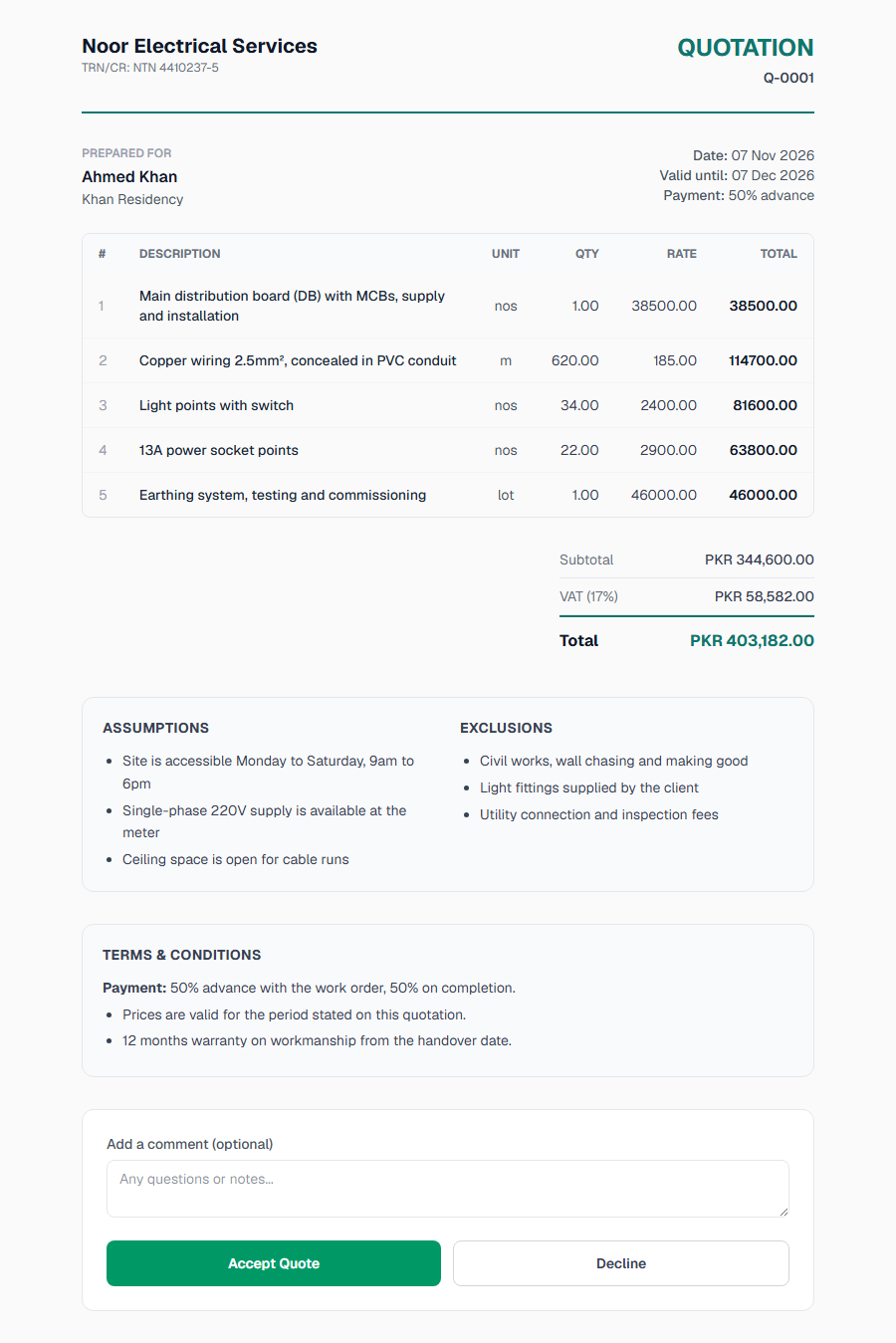
Related reading
Why Clients Reject Quotes (and How to Fix Each Reason)
Clients reject quotes mainly over unclear scope, missing exclusions, slow replies and low trust, not the price alone. Nine reasons, each with a fix.
How to Write a Winning Quotation: A Practical Guide for Contractors and Service Businesses
A winning quotation has seven parts: header, client, scope summary, line items, totals, exclusions and payment terms. How to write each, with an example.