Price the job on site. Send the quotation before you leave.
Describe the work in plain English. EstimateQuote drafts an itemised quotation priced from your own rate library, makes the PDF, and gives you a link to send on WhatsApp or email. Your client opens it on their phone and taps Accept; you get an email the moment they do.
Free plan, no card needed. Pro is $9 a month. Built by a two-person team in Islamabad; meet them.
Built for the way a trade business quotes
Six things, all built and in the product today. No add-ons, no per-user pricing.
AI drafts the itemised quote
Type the scope the way you would say it to a colleague. The AI splits it into line items with unit, quantity and rate, and marks each line with a confidence score so you know which ones to check. Every line stays editable.
Your rate library sets the prices
Rates come from your library first and the AI keeps its prices in range of them. Accounts in Pakistan and the UAE start with benchmark rates for their trade; elsewhere you add your own. Cost price and margin per line are visible only to you.
A client link with Accept and Decline
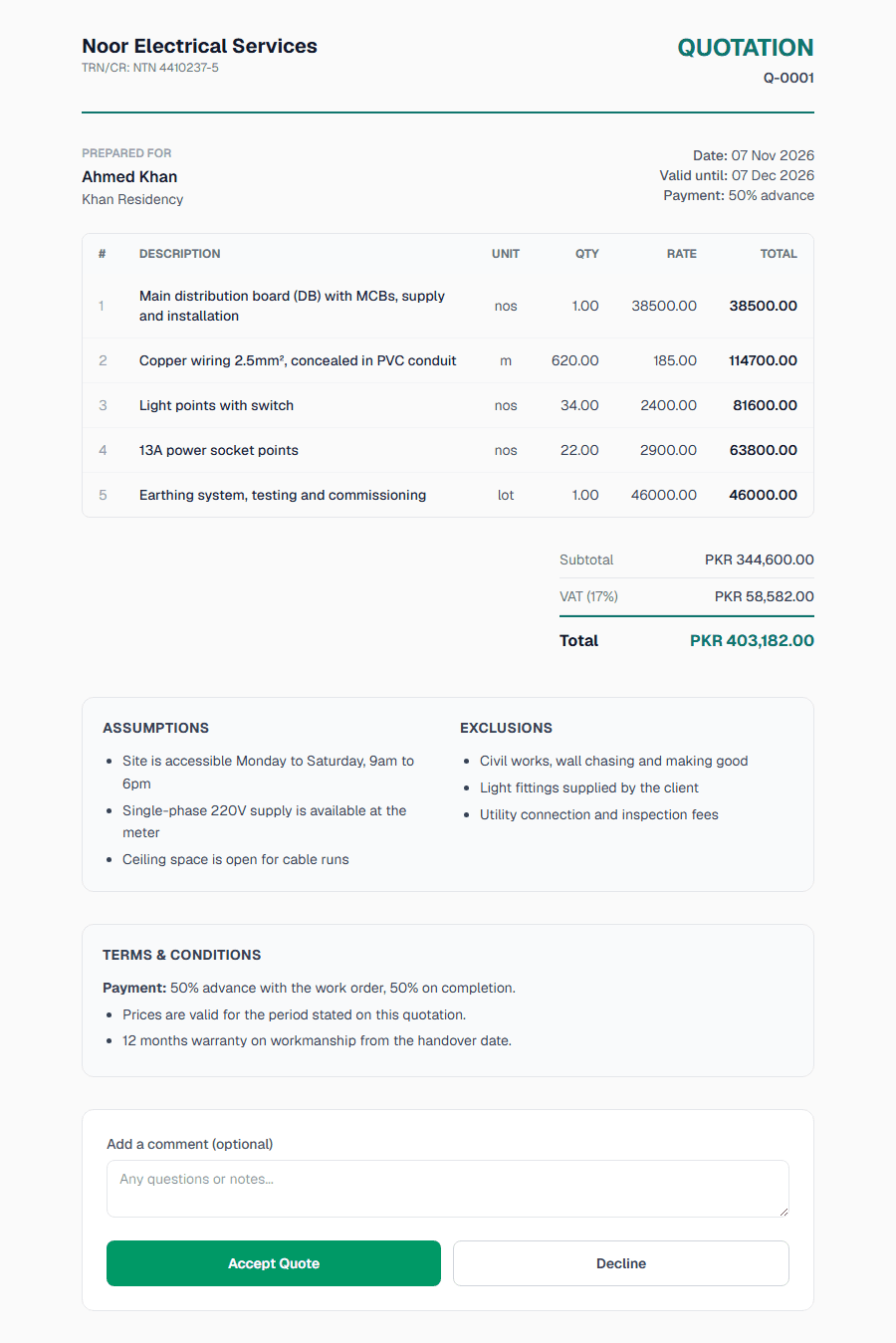
Your client opens the quote from a link, with no account to create, and taps Accept or Decline with an optional comment. You get an email when it is opened and again when it is answered, so you know when to call.
PDF, WhatsApp and email
Download the quotation as a PDF with your logo and brand colour, send the link on WhatsApp with a pre-filled message, or email it from the app. Free plan PDFs carry a small "Generated by EstimateQuote" footer; Pro removes it.
Assumptions, exclusions and terms
Write down what you assumed about the site and what is not included. Both appear under the total on the client page and in the PDF, next to your payment terms and conditions, which you set once for the company and can change per quote.
Templates and quote titles
Start from one of 20 industry templates on any plan, or on Pro save a finished quote as your own template for the next similar job. Give every quote a title so your list reads "Khan Residency rewiring" instead of Q-0007.
Who it is for
Trades that quote in line items, quantities and unit rates, and need the client to say yes before the next job starts.
Electricians
Light points, sockets, cable runs and the DB as separate lines, priced per point from your own rates, so the client sees where the money goes.
Plumbers
Fixtures, pipe runs and fittings itemised with unit and quantity, and "fixtures supplied by client" written into the exclusions before the argument.
HVAC contractors
Units, ducting, refrigerant lines and commissioning each on their own line, with the assumptions about access and power spelled out.
Solar installers
Panels, inverter, structure, cabling and net-metering paperwork in one quotation, priced from your library rather than from memory.
Builders & civil contractors
Measured quantities per item, subtotal, VAT or GST and a total the client can accept from their phone without another site visit.
Fit-out & interior contractors
Rooms, finishes and joinery as line items, with what is excluded listed under the total so scope creep has something to point at.
Also used by IT consultants, agencies and freelancers. Sign-up is open to any business that sends quotations; the trade list covers 22 types, from electrical to events and cleaning. Create a free account.
Three steps from scope to an accepted quote
You stay in control of every line. The AI does the first draft and the arithmetic.
Describe the job
Type the scope in plain English: rooms, points, runs, fittings, what the client supplies. Pick the client; currency and VAT come from your company settings.
Review the itemised quote and rates
The AI returns line items with unit, quantity and rate, priced from your rate library and marked with a confidence score. Edit any line, add assumptions and exclusions, check your margin.
Send the link or PDF; see when it is opened
Send the link on WhatsApp or email, or download the PDF. Your client reads it and taps Accept or Decline, and you get an email when they open it and when they answer.
Free plan available. Pro is $9 a month or $90 a year.
Prices are in US dollars and convert to your currency at checkout. Pro Annual comes with a 14-day free trial; cancel inside the trial and nothing is charged.
See full pricingFree
$0
- 10 quotes a month
- 5 AI generations a month
- 20 clients
- PDF, WhatsApp, email, client link
- “Generated by EstimateQuote” on the PDF
Pro
$9/month
- Unlimited quotes and clients
- 100 AI generations a month
- Your branding only on the PDF
- Save your own templates
- WhatsApp support from the founders
- Or $90 a year with a 14-day trial

Mujtaba Ali Saif
Co-founder

Zain Ali Haider
Co-founder
Who is behind it
Built by two engineers in Islamabad. Support comes from them.
Write to us with a bug, a rate you cannot find, or something your trade needs and the reply comes from the person who builds the product, within 24 hours. Pro accounts can also reach us on WhatsApp.
Frequently asked questions
- Is EstimateQuote free?
- Yes. The free plan includes 10 quotes a month, 5 AI generations a month, 20 clients, PDF export, WhatsApp and email sending and the client accept link, and it does not expire. Pro is $9 a month or $90 a year and adds unlimited quotes and clients, 100 AI generations a month, your own branding on the PDF and WhatsApp support from the founders. Prices and limits never change for existing subscribers.
- Do I need a credit card to sign up?
- No. You sign up with an email address and password or with a Google account and start on the free plan straight away; you confirm your email address before you send your first quote. A card is only asked for if you upgrade to Pro, through our payment processor Lemon Squeezy.
- Can I use my own rates?
- Yes. The rate library is yours: add items with unit and rate, and the AI prices from those first and keeps its suggestions in range of them. Companies registered in Pakistan or the UAE start with benchmark rates for their trade; everywhere else the library starts empty and you add the rates you quote with.
- Does my client need an account?
- No. Your client opens the quotation from a link you send on WhatsApp or by email, reads every line, and taps Accept or Decline, with an optional comment. There is nothing for them to install or sign up for. You are emailed when the quote is opened and when it is answered.
- Which currencies does it support?
- Your company picks its country from a list of 60 and gets that country's currency and default VAT or GST rate, for example PKR with 17% for Pakistan, AED with 5% for the UAE, USD for the US, GBP for the UK or INR with GST for India. You can change the tax rate, and every quote, PDF and client page uses your currency.
- Can I edit what the AI produces?
- Yes. The AI output is a draft: every line item can be edited, re-priced or deleted, you can add lines by hand, and the assumptions, exclusions and terms are yours to change before you send. Lines where the AI was unsure carry a lower confidence score so you know where to look first.
Send your next quotation from EstimateQuote
Set up your company, add a few rates, and draft the first quote in the same sitting. The free plan does not expire.